





How I Revived My MacBook Air 2017 with OpenCore Legacy Patcher (OCLP)
For a long time, my MacBook Air 2017 was still in excellent physical condition, but the software had started showing its age. Apple no longer supported the latest macOS updates for this model, which meant many modern applications were either losing support or refusing to update.
Instead of spending money on a new Mac, I decided to upgrade my existing machine using OpenCore Legacy Patcher (OCLP). This article shares my real experience, the problems I faced before upgrading, the installation process, and the improvements I noticed afterward.
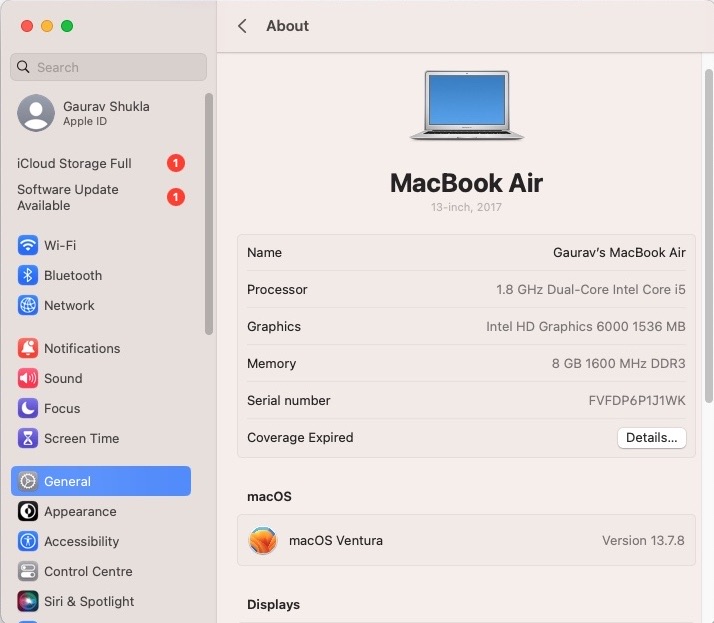
My MacBook
- Model: MacBook Air (2017)
- Processor: Intel
- Original macOS: Monterey
- Upgrade Method: OpenCore Legacy Patcher (OCLP)
Why I Decided to Upgrade
The laptop itself was still fast enough for web development, writing articles, browsing, and daily office work. The real problem was software compatibility.
Here are the issues I was facing:
- Google Chrome had stopped receiving the latest updates.
- Microsoft Teams required a newer version of macOS.
- Some modern applications no longer supported my installed macOS version.
- My Wi-Fi connection occasionally became unstable and disconnected unexpectedly.
Since the hardware was still working perfectly, replacing the entire laptop didn’t make sense. That’s when I decided to try OpenCore Legacy Patcher.
Preparing for the Upgrade
Before starting, I made a complete backup of my important files. I also created a bootable USB installer and downloaded the latest version of OpenCore Legacy Patcher.
Although the installation process requires attention, it is quite manageable if you carefully follow the official instructions.
Installing macOS with OCLP
The installation involved creating the installer, booting from the USB drive, installing the newer macOS version, and finally applying the required post-install patches using OpenCore Legacy Patcher.
After everything completed successfully, my MacBook booted normally into the newer version of macOS.
My Experience After the Upgrade
The difference was noticeable almost immediately.
- ✅ Google Chrome started receiving updates again.
- ✅ Microsoft Teams became compatible with the newer macOS version.
- ✅ Modern applications worked without compatibility warnings.
- ✅ Wi-Fi became much more stable during my daily use.
- ✅ Overall system performance remained smooth for everyday tasks.
One improvement that surprised me was the Wi-Fi stability. On the older installation, my connection would occasionally disconnect or switch unexpectedly. After upgrading, I haven’t experienced the same issue during normal usage.
Note: This was my personal experience. Results may vary depending on your Mac model and configuration.
Is OpenCore Legacy Patcher Safe?
OpenCore Legacy Patcher is a well-known open-source project that allows many unsupported Intel Macs to run newer versions of macOS. While thousands of users have successfully upgraded their Macs, you should always create a complete backup before making any major system changes.
Remember that OCLP is not an official Apple solution, so you should understand the risks before proceeding.
Would I Recommend It?
Yes—if your Intel Mac is still performing well but has become limited by software support, OpenCore Legacy Patcher is worth considering.
In my case, the upgrade allowed me to continue using the same MacBook without purchasing a new device. Chrome updates were restored, Microsoft Teams became usable again, Wi-Fi stability improved, and my laptop continues to handle daily work comfortably.
Final Thoughts
If your older Mac is being held back by software compatibility rather than hardware performance, OpenCore Legacy Patcher can significantly extend its useful life.
For me, upgrading was a practical decision that solved multiple everyday problems while saving the cost of buying a new MacBook.
Frequently Asked Questions
Can I install a newer macOS on an unsupported Mac?
Yes. OpenCore Legacy Patcher allows many unsupported Intel Macs to install newer versions of macOS, though you should always verify compatibility with your specific model.
Will Google Chrome work after upgrading?
In my case, Chrome started receiving updates again after installing the newer macOS version.
Did the upgrade improve Wi-Fi?
Yes, my intermittent Wi-Fi issue disappeared after the upgrade. However, this was my personal experience and may not apply to every Mac.
Should I buy a new Mac instead?
If your Mac still performs well for your workload, upgrading with OCLP may help you extend its lifespan before investing in new hardware.