







One of my clients needed a simple course management system for their Psychology tutoring website. At first glance, it seemed like a job for a learning management system (LMS) plugin such as LearnDash or LifterLMS.
However, after reviewing the requirements, it became clear that a full LMS would introduce unnecessary complexity. The client didn’t need quizzes, certificates, student dashboards, or payment gateways. They simply wanted an easy way to publish courses and manage registrations.
Instead of forcing the project into a large third-party plugin, I built a lightweight custom WordPress plugin tailored specifically to their workflow.
The Project Requirements
The website offered live online masterclasses for A-Level and GCSE Psychology students through Zoom.
The client needed the ability to:
- Create and manage courses from the WordPress dashboard.
- Display courses in a responsive three-column grid.
- Show an individual page for every course.
- Allow students to register online.
- Automatically place students on a waiting list once a course reached capacity.
- Send email notifications to both students and administrators.
- Provide a downloadable PDF information sheet for every course.
No payment processing was required, making a lightweight custom solution the better choice.
Why I Chose a Custom Plugin Instead of an LMS
Popular LMS plugins are incredibly powerful, but they are designed for complete online learning platforms. In this case, they would have introduced features the client would never use.
A custom plugin offered several advantages:
- Only the required functionality was developed.
- A cleaner WordPress admin experience.
- Faster performance with less unnecessary code.
- Complete control over both functionality and design.
Building the Plugin
1. Custom Post Type for Courses
The plugin starts with a custom post type called pz_course. This allows the client to create and edit courses using the familiar WordPress editor.
register_post_type('pz_course', [
    'labels'    => ['name' => 'Courses'],
    'public'    => true,
    'menu_icon' => 'dashicons-welcome-learn-more',
    'supports'  => ['title','editor','thumbnail'],
    'rewrite'   => ['slug' => 'masterclass']
]);
Each course behaves like a standard WordPress post while providing a dedicated structure for course management.
2. Custom Course Information
Every course includes its own metadata panel containing:
- Course title and topic
- Academic level
- Date and time
- Location or Zoom details
- Price
- Maximum capacity
- Downloadable PDF information sheet
All values are stored using the WordPress Post Meta API with properly prefixed custom fields.
3. Responsive Course Listing
I created a shortcode that displays every published course inside a responsive CSS Grid layout.
Each course card includes:
- Featured image
- Course information
- Price
- Date
- Dynamic availability badge
The availability badge automatically changes depending on remaining spaces.
- 🟢 Spaces Available
- 🔴 Full — Join Waiting List
The layout automatically adapts for desktop, tablet, and mobile devices.
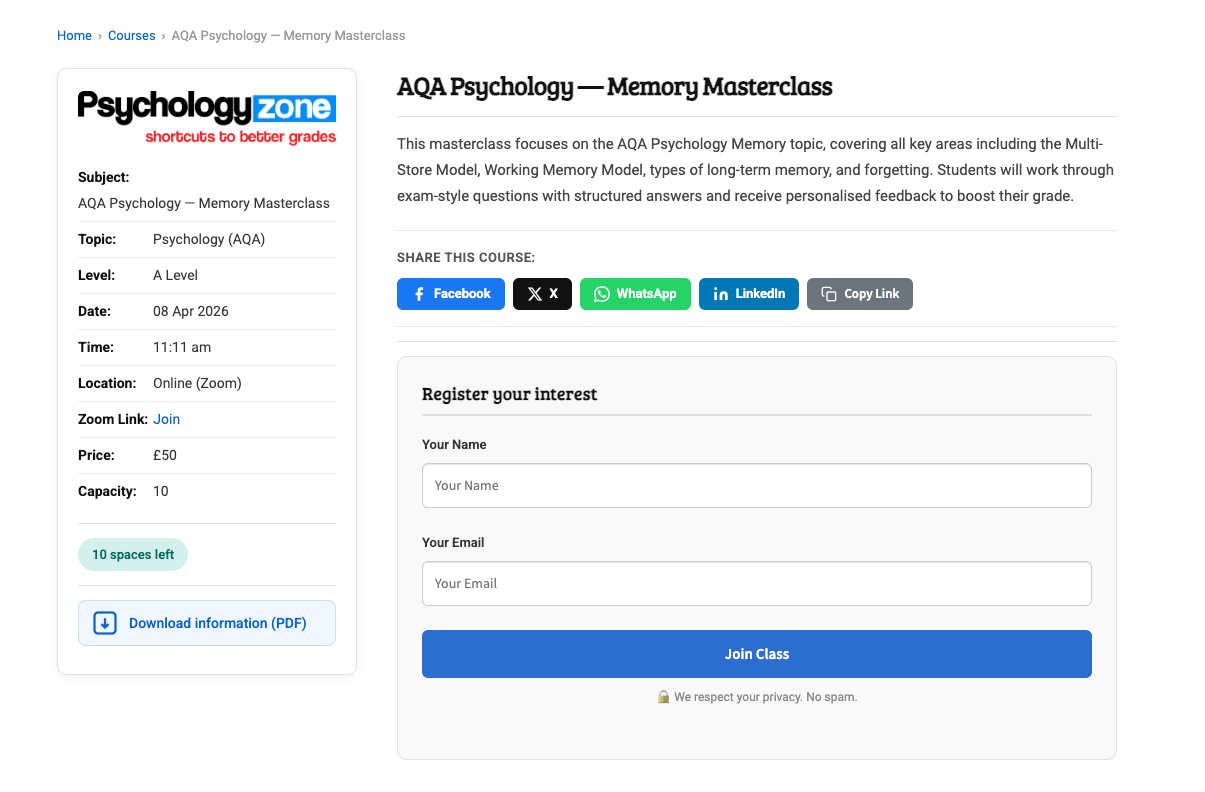
4. Custom Single Course Template
Instead of requiring theme modifications, the plugin includes its own dedicated template file for individual courses.
The layout consists of two sections:
- Course information panel
- Course description with registration form
The page also includes social sharing buttons and a downloadable course information PDF.
5. Automatic Waiting List
The registration process is handled entirely with AJAX.
When a visitor submits the form, the plugin:
- Checks the available capacity.
- Prevents duplicate registrations.
- Confirms the booking if spaces remain.
- Adds the visitor to the waiting list once the course is full.
$status = ($cap !== '' && $lft === 0)
    ? 'waitlist'
    : 'confirmed';
Because everything runs through AJAX, visitors receive instant feedback without reloading the page.
6. Automated Email Notifications
The plugin automatically sends different emails depending on the registration status.
- Administrator notification
- Student confirmation email
- Waiting list confirmation email
This removes the need for any manual communication after registration.
7. Course Signups Dashboard
A dedicated admin screen allows the client to manage registrations directly inside WordPress.
From this dashboard they can:
- View all registrations.
- Filter registrations by course.
- Move students between Confirmed and Waiting List.
- Delete registrations.
No database access or coding knowledge is required.
Technical Highlights
- Custom Post Types
- WordPress Meta API
- AJAX-powered registration
- Custom database table using
$wpdb - CSS Grid responsive layout
- WordPress Media Uploader integration
- Automatic rewrite rule flushing
- Theme-independent single template
One small but important improvement involved suppressing the theme’s default featured image output to avoid duplicate images inside the custom course template.
The Final Result
The finished plugin consists of a lightweight PHP codebase together with a small CSS file, JavaScript file, and one custom template.
The client can now:
- Create new courses within minutes.
- Monitor available spaces.
- Automatically manage waiting lists.
- Handle registrations directly from WordPress.
- Provide downloadable course information.
Most importantly, the solution delivers exactly what the client needed without relying on heavy LMS plugins or expensive subscriptions.
Key Takeaways
Not every WordPress project requires a premium plugin or a large framework. Sometimes a focused, purpose-built solution provides a better user experience, improved performance, and much easier long-term maintenance.
This project demonstrates how a custom WordPress plugin can solve a very specific business problem while keeping the website lightweight, maintainable, and future-proof.
Have a similar requirement?
If you need a custom WordPress plugin, booking system, directory, or business workflow built specifically for your project, feel free to get in touch.